"Stop emailing me about every single quote" is a reasonable thing to want, and it used to mean scrolling past your password and two-factor settings to find the switch. Notifications is now its own section, because it is the setting people come looking for by name.
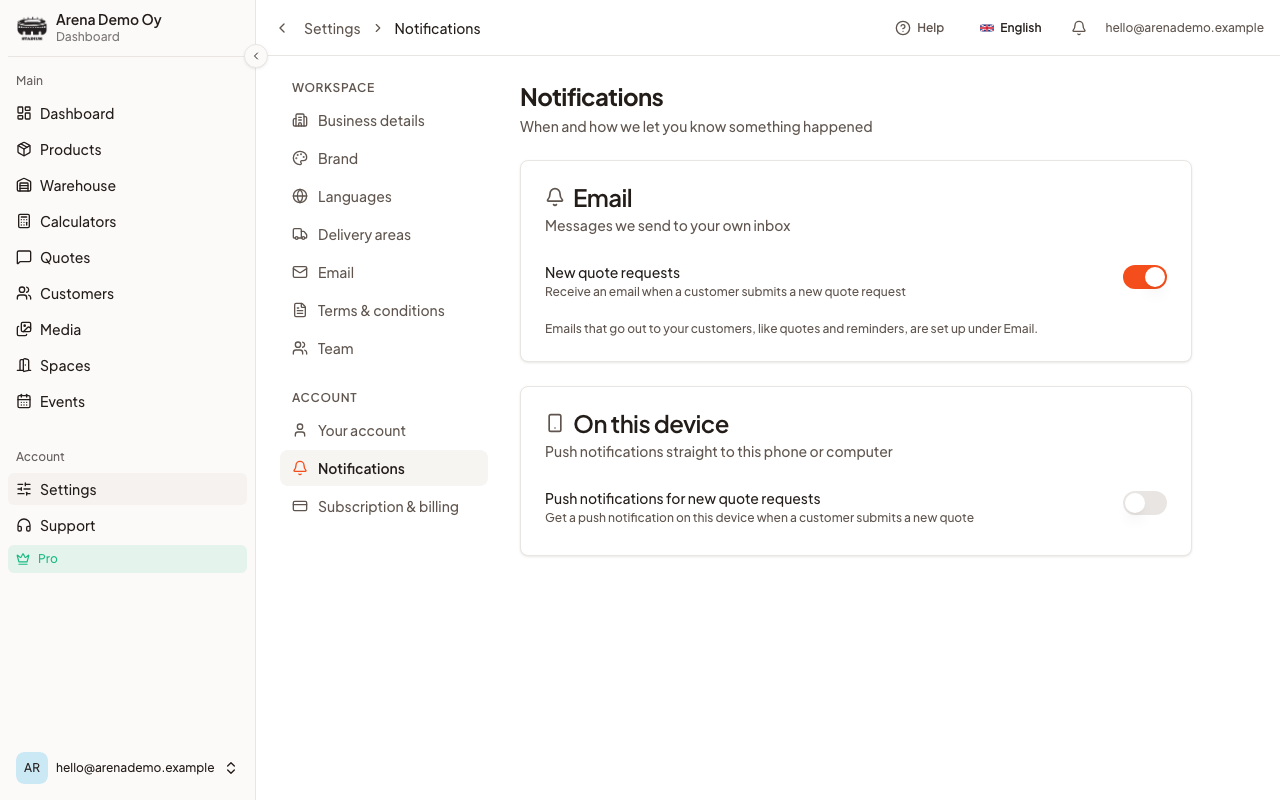
Where it is
- Log in to CaterWay.
- Open Settings from the menu on the left.
- Choose Notifications under Account.
The one email setting
Under Email there is New quote requests: an email to your own inbox whenever a customer submits a new quote request. On by default, which is almost certainly what you want when you are starting out and less certainly what you want at forty quotes a week.
On this device
If your browser supports them, a second card offers push notifications straight to the phone or computer you are reading on. This one is per device rather than per account: switching it on here does not switch it on for your laptop, and the phone needs to have CaterWay added to its home screen first on iOS.
The important distinction
These settings only affect messages addressed to you. Nothing here can stop an email reaching a customer.
That separation is deliberate, and it exists because it once went wrong: two toggles that looked like personal preferences were quietly gating the quote email your customer was waiting for. Customer-facing email, the quotes and the reminders, is set up under Settings › Email, and it is workspace-wide rather than personal.
Good to know
- Notification preferences belong to the person signed in, not the workspace. Each of your colleagues chooses their own.
- Turning off the new-quote email does not hide anything. Quotes still arrive in Quote Requests and still show on your dashboard.
- Reminder emails to customers are a different thing entirely, see Reminder emails.
Was this article helpful?